Identity Governance
Andrew Dennis, Senior Content/Growth Manager

What is Identity Governance (IGA) in 2025?

Learn the ins-and-outs of access management and how an end-to-end identity governance and administration tool like Lumos can help.

Table of Contents

Remember that intern that had access to your database last summer? Are you confident that their username and password were deactivated now that they have a full-time job at your rival’s business? What about that audit request that came through last week—will you be able to pull the information you need to stay in compliance and avoid penalties?

These very real worries aren’t the fault of you or your IT team. Everyone is doing the best they can with the tools they have. The real issue lies in how difficult it is to stay on top of permissioning, especially when companies are growing, with roles quickly changing.

Here at Lumos, we’ve seen it time and time again—IT teams are buried under repetitive tasks and can’t take the time to set and enforce best practices for security and compliance.

Don’t worry, we’re here to help. With our identity governance tools, your IT team can dot all the i’s and cross all the t’s to make sure your systems are as secure and compliant as possible. We’ve put together this comprehensive guide to identity governance to help you understand this complex topic. We’ll take a look at some identity governance examples, as well as answer questions like “what is an IGA framework?” Let’s get started!

What Is Identity Governance?

Identity governance, also known as identity governance and administration (IGA), is a broad term that covers all of the strategies to manage individual user access within an organization. Imagine you’re a superhero and you’ve got an awesome secret underground hideout for all your training montages and urgent phone calls from the mayor. You need a way to make sure your butler can get in while your bumbling friend (after all, she doesn’t know you’re a superhero) or the evil villain can’t. Identity governance is key here—you could employ a technology strategy like installing a retina scanner outside the door or create a policy with your friend that she is only allowed in certain rooms of your house.

This is, of course, a lighthearted analogy to help illustrate the identity governance definition—there are many types of technology, policies, and processes you can employ to secure your company’s sensitive information.

Although often shortened to just “identity governance,” the full term of identity governance and administration does include an important distinction.
Identity governance relates to activities like:

  • Visibility into the current state of user access across your tech stack.
  • Role management, allowing you to assign custom access levels to specific users or groups of users.
  • Segregation of duties where several people are required to complete a task in order to prevent errors or fraud.
  • Analytics and reporting in order to make decisions based on real-time data.

In addition to all of these, identity administration encompasses duties like:

  • Account and credentials administration where you’re managing the creation, maintenance, and deletion of user accounts and log in information.
  • User and device provisioning to ensure that critical user data like a job title or department is tied to the correct access level.
  • Entitlement management processes to make sure only authorized users can access sensitive information.

These activities are all closely related, but essentially, think of identity governance more as “policies” and the administration part as “tasks needed to implement those policies.” In other words, IGA as a whole addresses the core IT functions of authentication, authorization, privacy, data protection, and regulatory compliance.

Core Components of Identity Governance and Administration (IGA)

Identity Governance and Administration (IGA) is the system of policies, processes, and tooling that ensures every identity has appropriate access across its lifecycle. In practical terms, IGA helps organizations answer three questions continuously: 

  • Who has access?
  • Why do they have it?
  • And should they still have it? 

For IT and security leaders, the value of IGA comes from a few core capabilities that work together to keep access least-privilege, auditable, and aligned to business change. The core components of IGA are:

  • Identity Lifecycle Management
  • Access Requests and Approvals
  • Access Certifications and Reviews
  • Role Management (RBAC/ABAC) and Entitlement Modeling
  • Segregation of Duties (SoD) and Policy Enforcement
  • Reporting, Audit Trails, and Compliance Evidence

Identity Lifecycle Management

Lifecycle management is the backbone of IGA. It automates access changes when identities join, change roles, or leave. Joiner workflows provision Day-1 access based on role and policy so new hires are productive without ticket storms. Mover workflows remove outdated access before granting new entitlements, preventing privilege creep. Leaver workflows revoke access quickly, disable accounts, and preserve evidence to reduce breach risk.

The best lifecycle programs are event-driven from authoritative sources (usually HRIS) and apply consistent, policy-based access rather than ad hoc approvals.

Access Requests and Approvals

Even with automation, people need access outside their default roles. Access request workflows provide a controlled way to ask for permissions, route approvals, and record justification. Modern IGA systems support risk-based routing (e.g., privileged access requires stronger approval), time-bounded grants, and just-in-time/just-enough access patterns. 

By standardizing requests, organizations reduce shadow access, avoid shared credentials, and keep a clear trail of who approved what and why.

Access Certifications and Reviews

Certifications are periodic checks that validate access still makes sense. Review campaigns typically involve managers, app owners, or data stewards confirming whether identities should keep or lose specific entitlements. This is where IGA catches access drift that automation missed, such as: rights gained through exceptions, legacy groups, or organic team changes. 

Effective reviews are scoped to high-risk systems first, use clear role context, and drive timely remediation so they don’t become “rubber-stamp” exercises.

Role Management (RBAC/ABAC) and Entitlement Modeling

IGA needs a clean model of how the organization works. Role-based access control (RBAC) assigns access tied to job functions, while attribute-based access control (ABAC) uses traits like department, location, or project to grant dynamic entitlements. Entitlement modeling defines what permissions exist, what they do, and which are sensitive or privileged. 

Strong role and entitlement design simplifies provisioning, improves review quality, and reduces the number of one-off exceptions that accumulate risk.

Segregation of Duties (SoD) and Policy Enforcement

Segregation of Duties (SoD) prevents identities from holding conflicting permissions that could enable fraud or abuse; like creating and approving payments, or deploying production code and approving access logs. IGA enforces SoD through policy rules that block risky combinations, flag violations during requests, and surface toxic access paths during reviews. 

This is crucial for regulatory environments, but it also strengthens everyday security posture by shrinking the blast radius of any one compromised identity.

Reporting, Audit Trails, and Compliance Evidence

Finally, IGA must be provable. Reporting builds visibility into who has access, where exceptions exist, and how quickly lifecycle actions occur. Audit trails capture the full story of access decisions: requests, approvals, changes, review outcomes, and policy violations. For compliance, this evidence is what turns “we think we’re least privilege” into “we can demonstrate least privilege.” 

Mature teams use these reports to track posture trends and continuously improve governance instead of waiting for auditors to find gaps.

Identity governance vs IAM, PAM, and ISPM

Identity governance (often delivered through IGA platforms) is frequently grouped with IAM, PAM, and ISPM because all four touch access and risk. But they serve different jobs in the identity stack. IAM enforces who can sign in. IGA governs who should have access and why. PAM controls how privileged access is used safely. ISPM continuously measures whether identity risk is drifting out of bounds. 

For IT and security leaders, understanding these boundaries avoids tool overlap and helps you build a program that’s both secure and scalable.

IGA vs IAM (governance vs enforcement)

IAM (Identity and Access Management) is the operational gatekeeper. It handles authentication and access enforcement: SSO, MFA, conditional access, session policies, and real-time allow/deny decisions. If IAM is doing its job, users can only access what their current entitlements permit.

IGA (Identity Governance and Administration) sits upstream and downstream from that. Upstream, it defines what entitlements people should have based on role, attributes, policy, and risk. Downstream, it validates that entitlements remain appropriate over time through reviews and remediation. A simple way to remember it:

  • IAM asks “Can they access it now?”
  • IGA asks “Should they have access at all?”

IGA vs PAM (broad access vs privileged sessions)

PAM (Privileged Access Management) is specialized for high-risk access. It vaults admin credentials, brokers privileged sessions, records activity, and enables just-in-time elevation. PAM is about tightly controlling how privileged access is used when it’s needed.

IGA governs a much broader population of access—standard and privileged—across all apps and systems. It ensures privileged entitlements are granted only for valid reasons, to valid owners, with SoD controls and periodic recertification. PAM may manage the “admin session,” while IGA manages the “admin entitlement.”

  • PAM controls privileged use.
  • IGA controls privileged assignment.

IGA vs ISPM (periodic governance vs continuous posture)

ISPM (Identity Security Posture Management) is the continuous risk-sensing layer. It discovers identities and access relationships, maps attack paths, scores risk, and flags posture drift in near real time.

IGA is typically event- and campaign-driven: joiner-mover-leaver automation, access requests, and periodic access certifications. It’s excellent for structured governance, but risk can change between campaigns—new apps show up, entitlements drift, or movers accumulate access.

Think of it like this:

  • IGA is the system for making and validating access decisions on a schedule.
  • ISPM is the system for detecting when access becomes risky between schedules.

How These Tools Complement Each Other

In a mature identity program, these tools form a loop:

  1. IAM enforces access at sign-in and during sessions.
  2. IGA defines and governs entitlements through lifecycle automation, requests, reviews, and SoD policies.
  3. PAM secures privileged credentials and sessions tied to those entitlements.
  4. ISPM monitors outcomes continuously, prioritizes the riskiest exposures, and triggers fixes back through IGA/IAM/PAM.

How Identity Governance Works

Identity governance works like a continuous operating loop that keeps access aligned with real business needs. The goal isn’t just to grant and revoke permissions, but to maintain a defensible least-privilege posture as people, roles, apps, and risks change. 

In 2025, where access is spread across hundreds of SaaS tools, cloud environments, and non-human identities, governance only succeeds when it’s systematic, automated, and regularly validated. Here’s how the process runs end-to-end.

  1. Discover Identities, Apps, and Entitlements
  2. Define Roles, Policies, and Least-Privilege Baselines
  3. Automate Provisioning and Deprovisioning
  4. Run Periodic Access Reviews and Recertifications
  5. Remediate Exceptions and Continuously Improve Controls

1. Discover Identities, Apps, and Entitlements

Everything starts with visibility. Identity governance platforms connect to your authoritative sources (HRIS, directories, IdPs) plus your application and infrastructure stack to create a unified inventory of identities and access. That inventory includes human users (employees, contractors, vendors) and non-human identities like service accounts, API tokens, bots, and workloads. It also maps every entitlement: groups, roles, permissions, data access paths, and inherited rights.

Discovery matters because you can’t govern what you can’t see; especially with shadow apps and unmanaged accounts that silently expand risk.

2. Define Roles, Policies, and Least-Privilege Baselines

Once you know what access exists, you define what access should exist. This step translates business structure into access logic. Roles (RBAC) bundle permissions based on job function, while attributes (ABAC) add dynamic rules tied to department, location, seniority, project, or risk tier. Policies layer on constraints like MFA requirements, approval levels for privileged rights, time-bounded access, and segregation-of-duties rules. 

Together, roles and policies form your least-privilege baseline – the default access state identities should start with and return to as they move through the org.

3. Automate Provisioning and Deprovisioning

With baselines in place, governance shifts from manual tickets to automation. Joiner-Mover-Leaver (JML) workflows provision access when someone starts, adjust it when they change roles, and revoke it when they leave. Requests outside baseline flow through standardized approvals with risk-based routing and expiration. Automation removes delay and inconsistency, but it also reduces security drift: access is granted for a reason, through policy, with a clear owner and audit trail. 

The best programs are event-driven from authoritative systems so changes happen immediately, not in overnight batches.

4. Run Periodic Access Reviews and Recertifications

Automation handles the bulk of lifecycle change, but it can’t prevent every form of access creep. That’s why identity governance includes periodic access reviews (certifications). Review campaigns ask managers, app owners, or data stewards to confirm whether access is still appropriate. High-risk systems and privileges are reviewed more often, while low-risk access may follow a lighter cadence. 

Reviews surface issues like stale entitlements, “keep forever” exceptions, inherited rights that no longer fit a role, or toxic combinations that slipped through policy enforcement.

5. Remediate Exceptions and Continuously Improve Controls

The final step is closing the loop. Every exception found in reviews – unused access, SoD violations, orphaned accounts, over-privileged roles – must be remediated through revocation, role redesign, or policy tightening. Governance teams then use those outcomes to improve the system: refining roles, adjusting approval rules, expanding integrations, and tuning review scope so future drift is caught earlier or avoided entirely. 

Over time, this cycle makes access cleaner, audits smoother, and security stronger without slowing the business down.

What Is Enhanced Identity Governance?

While IGA has many benefits, the next level of identity governance involves security models known as “least privilege” and “zero trust.” These overarching philosophies help cybersecurity professionals get in the right mindset to prevent bad actors from wreaking havoc.

  • Least privilege is a concept where you only provide the minimum access that a user needs to do their job. For example, instead of providing a data entry role with the ability to run custom accounting reports, access bank account information, and view every user’s activity, you would restrict that role’s access to only the data entry portions of your accounting platform.
    To put it another way, remember your super sweet superhero headquarters? Well, you would probably set the retina scan to allow your trusty butler, Arthur, to come in (to tidy up, bring you snacks, and give you that sage advice), but might not give him the passwords to your computer just in case he gets captured by your arch nemesis.
  • Zero trust enforces a “never trust, always verify” approach to access. Essentially, you should always assume that the person attempting to use your system could be a malicious actor. For example, rather than allowing a user to “log in for 30 days” on your system, you could verify the user’s identity every time they use the system and, ideally, verify periodically while they’re using it.
    Think of it like this: imagine you’re using your supercomputer to crack the identity of the latest villain, The Copycat, attacking your fair city. Engrossed in your work, you’re barely paying attention as Arthur bustles around, cleaning and organizing your weapons. “Oh darn,” Arthur mumbles to himself, “I forgot to grab a cloth for polishing!” He leaves the room, leaving the door slightly cracked. Five minutes later, someone who seems to be Arthur comes back in.

But remember - the door wasn’t shut all the way! The new person in the room didn’t actually use the retina scan to enter, nor did they speak upon re-entering the room. The nefarious Copycat is notorious for shapeshifting! It would be so easy to ignore this, as you’re working away. He was only gone for five minutes! Plus, it may seem silly to have Arthur back out of the room and use the retina scan to enter and provide his spoken secret word that only he and you know. However, it’s the only way you’ll have peace of mind.

As you can tell from the above example, even two different verification methods isn’t enough. After all, The Copycat might be able to copy even the eye structure and pass a retina scan or weasel the password out of Arthur after tying him up in a closet. To fit with zero trust security principals, you’ll need to continuously monitor him to see if he has any suspicious behavior and if he can continue to pass identity checks. He has to constantly earn your trust, and you have to be continually calculating whether he is who he says he is.

To learn more about least privilege and zero trust, you can download our free resource today!

What Are the Identity Governance and Administration Standards?

Unfortunately, there isn’t one single IGA standard that can be applied to all situations; there are, however, many different standards that may need to be folded into your identity governance framework. These largely depend on your industry and individual priorities—like SOX, HIPAA, or NIST SP 800-207. Creating your own framework involves setting specific goals for security and compliance, and selecting the right IGA tools to support your objectives.

Let’s take a look at these three US standards—SOX, HIPAA, and NIST SP 800-207—to understand their purpose.

  • Sarbanes-Oxley Act (SOX) was implemented in 2002 by Congress as a response to the Enron scandal. Essentially, this act “requires corporate executives to certify the accuracy of their company’s financial statements; maintain and assess internal controls to prevent wrong, misleading, or fraudulent financial data; and imposes criminal penalties for misleading shareholders and altering documents to impede an investigation.”

    SOX compliance affects both the financial side of your business and your IT processes. This act regulates which documents you must store, how you access them, and how long you must keep them. When developing your IGA framework, it’s important to remember SOX and put policies in place to follow this regulation. Even if you’re not required to by law (for example, if you’re not a publicly traded company), it is still considered best practice to follow these guidelines.  

  • SOC 2 is a voluntary set of standards that demonstrates your dedication to a higher level of security. This framework is built on the five “Trust Services Criteria,” developed by the American Institute of Certified Public Accountants. These five criteria are security, availability, processing integrity, confidentiality, and privacy.

  • ISO 27001 is another voluntary standard created by the International Organization for Standardization. This framework was developed to “provide a model for establishing, implementing, operating, monitoring, reviewing, maintaining and improving an information security management system."
  • Health Insurance Portability and Accountability Act (HIPAA) “establishes national standards to protect individuals’ medical records and other individually identifiable health information.” In essence, any healthcare provider must safeguard protected health information and only allow access by authorized individuals. IGA processes like entitlement management or role-based management can help healthcare providers comply with HIPAA regulations.

  • NIST SP 800-207 is not a regulation, but it is a set of standards that can help you develop your own zero trust framework. The three core principles of zero trust, based on this standard are:
  1. Continuous verification where authentication and authorization are checked on an ongoing basis.
  2. Limiting the “blast radius and setting automated detections to drop access levels based on risky behavior by users.
  3. Automated context collection and response to ensure quick action and leveraging of real-time data.

These are just a few examples of the standards and regulations that you may want or need to consider when developing your IGA framework.

{{incontentmodule}}

Governing Non-Human Identities

Non-human identities (NHIs) now outnumber human users in most environments, and they’re often the least governed. Service accounts, tokens, workloads, bots, and AI agents power critical automation; but they also create silent, high-impact risk when permissions sprawl or ownership is unclear. 

Identity governance in 2025 has to treat NHIs as first-class citizens: discover them, scope them, monitor them, and retire them on time. The sections below cover the major NHI categories and the control patterns that keep them safe.

  • Service Accounts and Shared Credentials
  • API Tokens, OAuth Apps, and Secrets
  • Workload Identities (cloud/Kubernetes)
  • Bots, RPA, and CI/CD Identities
  • AI Agents as Emerging NHIs
  • Ownership, Lifecycle Controls, and Recertification

Service Accounts and Shared Credentials

Service accounts run background jobs, integrations, and system-to-system workflows. The biggest problem is that they’re frequently over-privileged and poorly owned, especially when created as “temporary” fixes. Governance should require unique service accounts per application or function (no shared “integration-admin”), tight least-privilege roles, and explicit owners at the team level.

Track creation and last-used timestamps, enforce MFA or equivalent controls where interactive access exists, and disable or rotate accounts that are dormant or no longer mapped to a live workload.

API Tokens, OAuth Apps, and Secrets

API keys, OAuth apps, and embedded secrets are easy to mint and hard to see—making them a common breach path. Governance starts with inventory: identify where tokens exist, what scopes they carry, and which apps or users authorized them. Enforce short-lived tokens by default, require centralized secret vaulting, and block hardcoded secrets in code repositories. 

For OAuth, restrict app approval to vetted publishers, narrow scopes to real tasks, and revoke tokens automatically when the approving user changes roles or leaves.

Workload Identities (cloud/Kubernetes)

Workload identities represent compute resources (VM roles, pods, functions) that need access to other systems. In cloud and Kubernetes, these identities are created dynamically and can inherit broad permissions through misconfigured roles. Governance should rely on workload-native identity (cloud roles, Kubernetes service accounts, OIDC federation) with strict policy boundaries. 

Map each workload identity to a service owner, pin permissions to specific namespaces or environments, and continuously detect drift; like workloads assuming roles they don’t need or accessing sensitive data paths unexpectedly.

Bots, RPA, and CI/CD Identities

Automation bots and CI/CD pipelines often require elevated access to deploy code, run scripts, or manipulate infrastructure. The risk is “pipeline privilege creep,” where automation identities accumulate rights across multiple systems with no periodic pruning. Govern these identities like privileged users: isolate them per pipeline, apply just-in-time elevation for sensitive steps, require signed artifacts and approval gates, and log every action. 

When pipelines change ownership or are decommissioned, their identities must be revoked immediately.

AI Agents as Emerging NHIs

AI agents introduce a new kind of non-human identity: autonomous actors that can chain tools, delegate tasks, and act on behalf of users. They need explicit registration, purpose scoping, and capability-based access rather than static admin roles. Limit which tools agents can call, where outputs can go, and who they can impersonate. 

Monitor for behavioral drift (new tool usage, unexpected targets, abnormal volumes), and implement kill switches so agents can be shut down instantly if they deviate or are compromised.

Ownership, Lifecycle Controls, and Recertification

Across every NHI type, three governance rules matter most: ownership, lifecycle, and review. Every NHI must have a named team owner and documented purpose. Lifecycles should be time-bounded or event-driven—created through approved flows, rotated regularly, and retired when the workload or business need ends. 

Recertifications should happen on a tighter cadence than for humans, using usage data to remove permissions that haven’t been exercised. 

When NHIs are governed this way, automation stays powerful without becoming your biggest invisible risk surface.

What Is an Identity Governance Solution?

Identity governance solutions, like that offered by Lumos, provide the tools and technologies to manage user identities and their access rights within an organization. With the right solution, you can ensure that only authorized individuals can access specific systems, applications, and data—all according to their roles and responsibilities.

With an end-to-end IGA solution like Lumos, you can breeze through access requests and user access reviews. You’ll be able to control and manage access to SaaS, cloud, and internal tools. In fact, you can:

  • Set up one-click onboarding and offboarding automations to manage app access and permissions
  • Enable employee self-service access requests so that your teams can see and request access to the apps they use in their daily workflows.
  • Create automated access reviews, making SOX, SOC 2, HIPAA, and ISO 27001 audit prep quick and simple with audit-friendly reporting.

What Does an Identity Governance Dashboard Look Like?

With Lumos, your IGA dashboards are user-friendly and optimized to fit your workflow! Let’s take a look at a few examples:

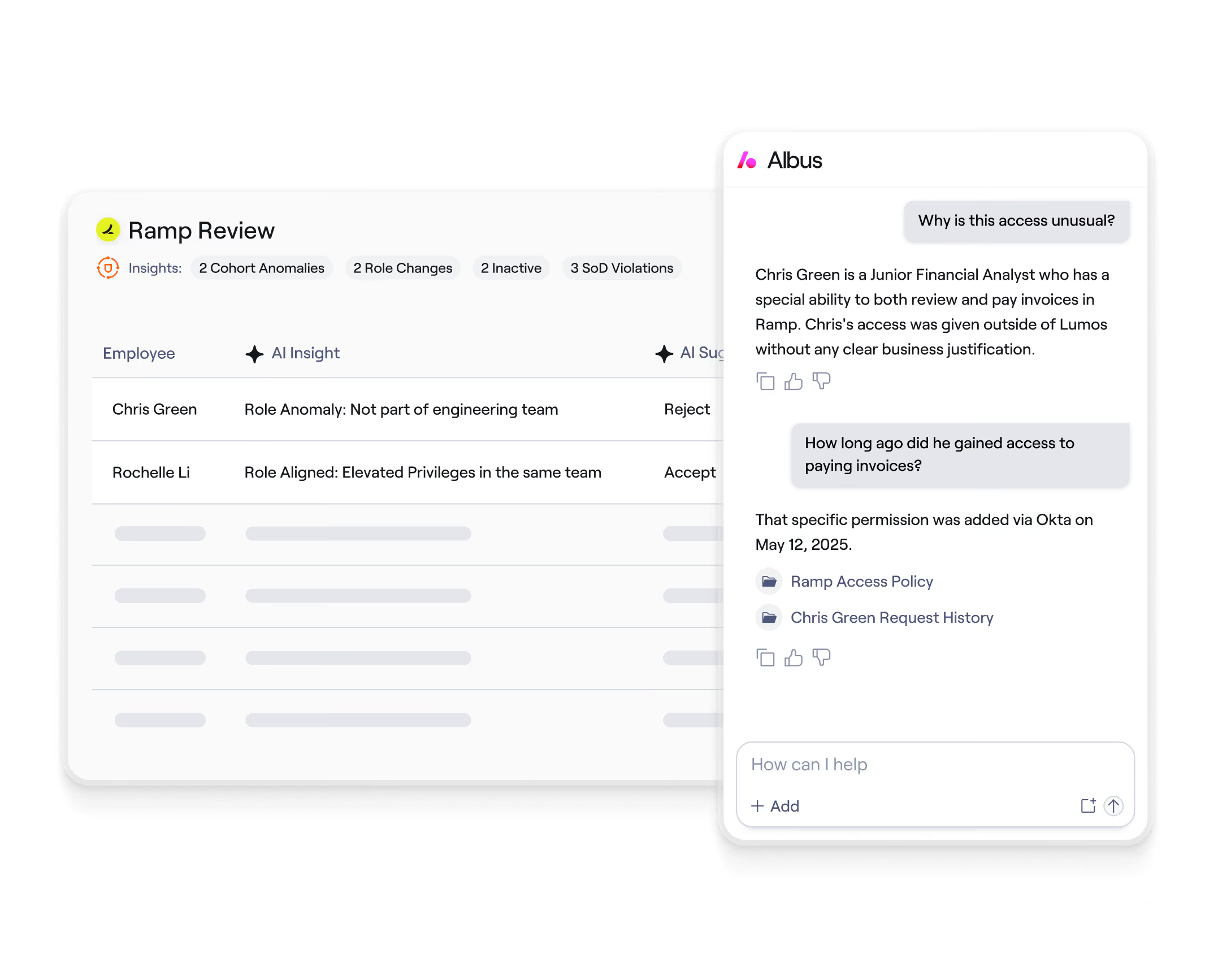
  • Access Reviews

As you can see from this dashboard, Lumos makes access reviewing a snap. You’ll be able to see what permissions are given to each employee, their last activity, and what department they fall under. Plus, you’ll have a simple interface to approve or deny the access.

  • Self-Service Access Requests

Employees can use Lumos to ask for access to any app they might need. Your IT team will receive this simple notification, allowing efficient approval or denial of requests.

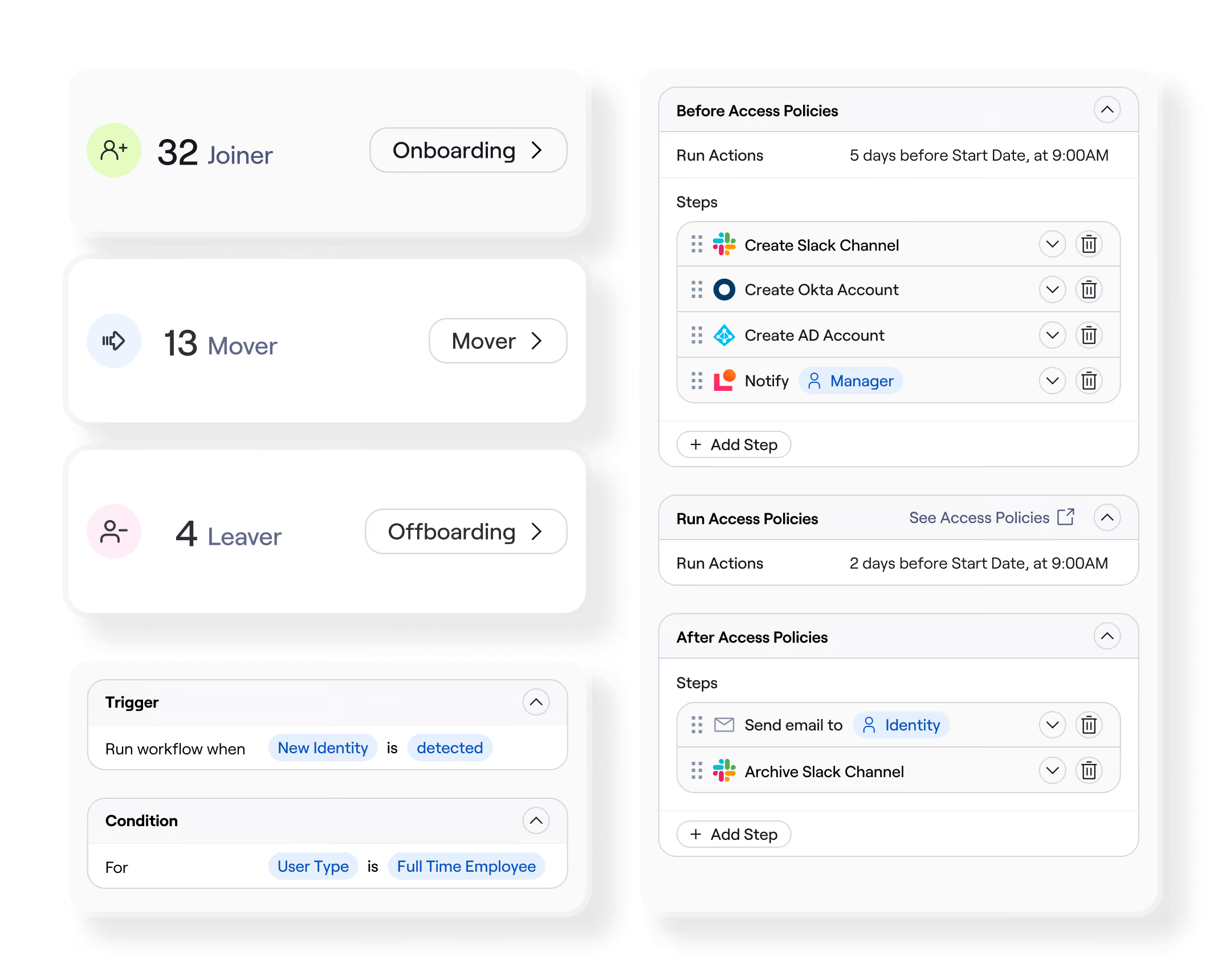
  • Automated onboarding and offboarding

You can implement Joiner-Mover-Leaver workflows and provision access through direct integrations, your SSO Provider, iPaaS platforms or APIs with the help of this streamlined dashboard.

What Are the Use Cases for Identity Governance and Administration?

IGA use cases can be found in almost any industry: from SaaS to finance, healthcare, education, government…the list is endless. In today’s digital landscape, companies across the spectrum need to secure their systems in order to prevent bad actors from wreaking havoc. IGA solutions like Lumos help businesses protect themselves and their customers—as well as save time and money by eliminating repetitive tasks for IT teams.

What Is an Example of Identity Governance?

For a practical example of how identity governance can make a big difference, let’s take a look at how Chegg partnered with Lumos. This student-first connected learning platform had a big problem: their support staff was bogged down with repetitive accessing tasks. Additionally, they needed a way to ensure that their access reviews were SOX-compliant.

With Lumos, they found an IGA solution that saved them both time and money. Brian McGuiness, VP of IT Operations at Chegg, noted the quick results: “our support staff now focuses on more complex issues. In our experience, the return on investment was almost immediate.”

These results weren’t just based on a gut feeling—the quantifiable impact from using Lumos was:

  • 25% of IT tickets automated
  • 99.6% reduction in ticket time-to-resolution
  • 30 days to value.

“We were promised a consumer-level tool and Lumos lives up to that,” Patrick Achuff, the Staff IT Systems Administrator noted. “It’s intuitive and easy to use.” With the ability to automate access reviews for SOX-compliance, implementation of self-service access requests, policy-based approval workflows, and automated onboarding and offboarding, Chegg won’t get distracted from their real mission: helping students achieve their best, in school and beyond.

Best Practices for Implementing Identity Governance

Implementing identity governance is less about turning on a tool and more about building a repeatable control system that keeps access aligned to the business. In 2025, the biggest risks come from SaaS sprawl, non-human identities, and constant org change – so governance has to be practical, automated, and measurable. 

The best programs don’t try to solve everything at once. They focus on high-impact scope first, clean underlying data, and scale by proving outcomes. Here are the practices that consistently lead to successful rollouts.

Start with High-Risk Systems and Roles

Begin where the blast radius is largest: systems that hold sensitive data, control revenue, or grant privileged access. Typical early targets include IdPs/directories, finance and HR platforms, cloud consoles, production environments, and core customer data stores. Pair that with high-risk roles: admins, finance approvers, developers with production access, and third-party users. 

Scoping this way gives you quick wins and reduces the chance of audit findings or identity-driven incidents while you build momentum.

Clean up Entitlements and Standardize Naming

Identity governance can’t work on messy permissions. Before automating at scale, clean up entitlements: remove dead groups, retire duplicate roles, and clarify what permissions actually do. Standardize naming and descriptions so reviewers can make informed decisions (e.g., “Salesforce_ReadOnly_US” is far clearer than “SFDC_Group_12”). Tag entitlements by sensitivity and privilege level. 

This upfront hygiene dramatically improves access review quality and reduces false positives in policy enforcement later.

Automate JML and Least-Privilege Provisioning

Joiner–Mover–Leaver automation is the backbone of governance. Connect your HRIS and other authoritative sources to trigger access changes automatically. Use role- and attribute-based baselines to grant Day-1 access without tickets, remove old access during role changes before adding new rights, and revoke access immediately on exit or end-date. Bake in least-privilege defaults and time-bounded access for exceptions. 

When lifecycle automation is strong, you spend less time cleaning up drift and more time improving posture.

Design Review Campaigns

Access reviews fail when they’re too big, too vague, or too frequent without purpose. Design campaigns that people actually complete: scope to high-risk apps first, keep reviews role-contextual, and present permissions in plain language. Use risk-based cadence—privileged access reviewed more often, low-risk access less often. Provide clear due dates, escalation paths, and runbooks for reviewers so decisions aren’t guesswork. 

The goal is signal, not checkbox completion.

Enforce SoD Rules and Exception Workflows

Segregation of Duties (SoD) prevents toxic permission combinations that enable fraud or abuse. Define SoD rules for your most sensitive processes (payments, approvals, production changes, customer data exports) and enforce them at request time and during reviews. Just as important: build a clean exception workflow for legitimate edge cases. Exceptions should be time-bounded, require higher-level approvals, and be auto-surfaced in future certifications. 

Without this, SoD becomes either too rigid to use or too weak to matter.

Measure outcomes and Iterate Continuously

Identity governance is never “done.” Measure what changes: time-to-provision for joiners, time-to-revoke for leavers, privilege creep across movers, orphaned account rates, SoD violations, and review removal rates. Use these metrics to refine roles, tighten policies, expand integrations, and tune review scopes. If your KPIs don’t move, pause scaling and fix the root cause; usually data quality, role design, or workflow friction. 

Continuous iteration is what turns governance from a project into a durable security advantage.

How Do I Find the Best Identity Governance Tools?

Choosing the best solution for your organization should involve considering factors like comprehensive coverage, scalability, advanced reporting, and more. After all, there are many identity governance and administration vendors and solutions out there promising the world. We’ve put together this short checklist to help you evaluate IGA tools, so you can select the right solution for your business’s unique needs and objectives:

  • Will you have comprehensive coverage?

It’s important to look for a solution that covers all aspects of identity governance—including provisioning, deprovisioning, access requests, and more.

  • What compliance support does this vendor offer?

You’ll want a tool that helps you comply with the regulations and standards of your industry.

  • Can this solution grow with your company?

The only thing you can count on is change—so cover your bases with a solution like Lumos that can accommodate more users and increasingly complex scenarios over time.

  • What is the user experience like?

At the end of the day, people want tools that are intuitive and straightforward, so be sure to consider the user interface and experience for both administrators and end-users.

  • Are there deep integration capabilities?

It’s vital that the solution integrates seamlessly with your entire tech stack, instead of disrupting your existing workflows.

  • Does this solution leverage automation effectively?

Look for a solution that relieves the burden on your IT team, reducing manual tasks and freeing them to focus on more strategic assignments.

  • Are analytics and reporting built into the platform?

In order to make data-based decisions, you need easy-to-access information. Be sure that the reporting capabilities are detailed and audit-friendly.

  • What level of support does the vendor offer?

You’ll want a true partner like Lumos to help you navigate IGA effectively.

  • Is this solution cost-effective?

Be sure to evaluate the tool’s cost compared to the value it brings to your organization.

Lumos: Where Compliance Meets Convenience

Are you ready to transform how your organization manages user access? With Lumos, you’ll have unparalleled visibility and control over your identity governance. And did we mention that you’ll have the workflow automation power of an IGA tool combined with the visibility and cost management controls of a SaaS management solution? Lumos is truly an end-to-end solution to help your IT team achieve compliance, drive productivity, and manage costs.

Simple next steps you can take:

  • Explore the nuances of compliance and how IGA can help your team shine by downloading our free IGA guide.
  • Use our ROI calculator to learn how much time you’ll save by implementing IGA policies.
  • Book a demo today to see Lumos in action.  

Identity Governance FAQs

What’s the difference between IGA and IAM?

IAM enforces access in real time (SSO, MFA, login policies). IGA governs access over time – deciding who should have access, automating lifecycle changes, and running reviews to keep it least-privilege and auditable.

How often should access reviews happen?

Use a risk-based cadence: high-privilege and sensitive systems quarterly (or more), standard business apps semiannually, and low-risk apps annually. Review frequency should also increase after major org or system changes.

What apps should be in scope first?

Start with crown-jewel and high-risk apps: IdP/directories, finance and payroll, cloud admin consoles, production systems, data warehouses, and any apps holding regulated or customer data.

Does IGA cover non-human identities?

Yes – modern IGA should govern service accounts, API tokens, workload identities, bots/RPA, CI/CD identities, and AI agents, with ownership, least-privilege baselines, and regular recertification.

How does identity governance reduce risk and cost?

It cuts over-privileged access, removes stale accounts, and enforces SoD, lowering breach and audit risk. It also reduces IT tickets and manual reviews, speeding onboarding/offboarding and shrinking compliance effort.

What are common implementation mistakes?

Trying to govern everything at once, automating on messy entitlements, weak role design, overly broad review campaigns, ignoring non-human identities, and not tracking KPIs—leading to low adoption and persistent drift.

From Start to Certificate: A Practioner's Guide to SOX Compliance

Download our guide to master SOX compliance at your organization

Download Now!
Download Now
arrow right icon
From Start to Certificate: A Practioner's Guide to SOX Compliance

Download our guide to master SOX compliance at your organization

Download Now!
Download Now
arrow right icon