
See and Control Every Tool Call with MCP Governance
Visibility and runtime control over every MCP server and tool call in Claude Code and Codex.

Trusted by the world's most innovative companies














Agents Inherit Human Access that You Can't Control
An AI agent running in an employee's session can reach whatever that person can reach. MCP servers grant agents far more access than any one task needs and agents work at a scale and speed that no human can, creating significant risk. One mistake or malicious instruction can turn into thousands of harmful actions before anyone catches it. Worse, this runtime activity is completely invisible in most organizations.

Visibility into every MCP server and agent tool call
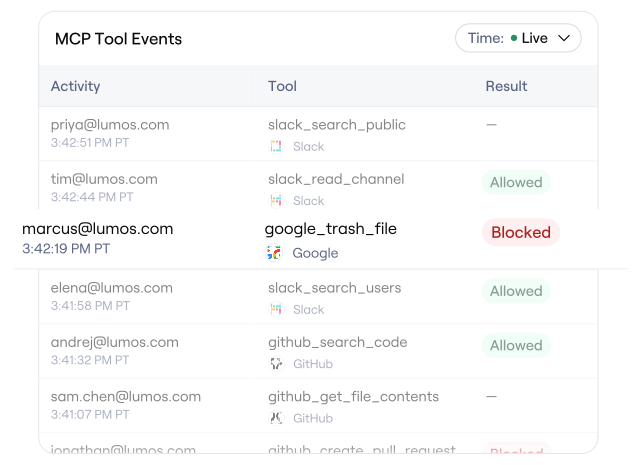
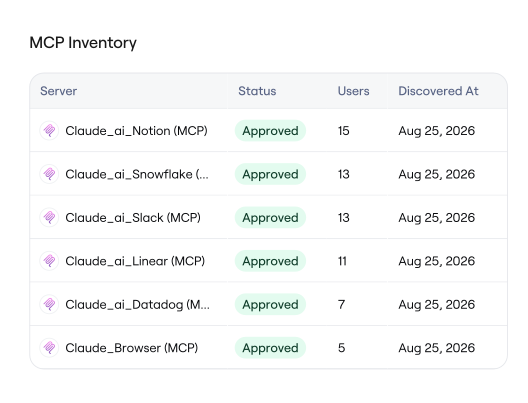
Monitor every MCP and tool call made across your company, including even locally added MCP servers, bash scripts, and agent browser use.

Analyze access patterns in seconds
Process activity from all agents in your company, whether hundreds or tens of thousands, to uncover anomalous behavior and dangerous access patterns.

Block risky actions with runtime policies
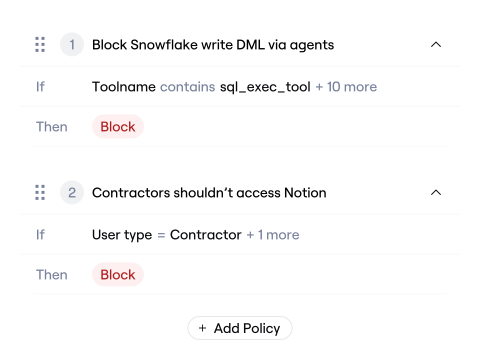
Decide which agent MCP and tool calls to allow or deny with fine-grained policies.
Bring
Albus
to Agent Oversight
Ask which MCP servers your teams actually use, which tool calls are most risky, or what a spike came from, and Albus reads your call history and answers. Describe the rule you want in plain language and Albus writes the policy, using the usage it can already see to get the conditions right. It knows which servers and tools exist in your org, so the policy fits your environment instead of a template.
Built for How Agents Actually Work
How MCP Governance Works
A hook, not a gateway
Lumos installs a hook that runs before every tool call, sends the call for a decision, and returns allow or deny. Nothing reroutes, and no MCP server has to be reconnected, and decisions are in milliseconds.

Visibility from day one
Turn it on and all MCP servers and tool usage appears as people work, approved or not. Every call is recorded with details about the tool type, server, tool inputs, human identity, and policy decision.
Set policies when ready
Use MCP and tool call history to build effective policies and provide guardrails to ensure safe agent execution while mitigating risky actions.
Additional Resources
The Agent Access Problem
The questions security leaders are asking about agent access, and practical first moves that work with what you already have.

Control Agent Access at Runtime
Why agent security is an access problem, and what it takes to make a policy decision before a tool call runs.
Frequently Asked Questions

MCP governance is the practice of seeing and controlling the tool calls AI agents make through the Model Context Protocol, including which servers an agent can reach and which tools it can run. Lumos governs MCP through a hook that runs before each tool call, so every call is recorded and policy decides whether it executes.
An agent runs inside an employee's session and can reach whatever that employee can reach, so it inherits access that was never granted to it directly. MCP servers commonly grant broader scopes than a given task needs, and agents act at machine speed, so a single over-permissive connection can be exercised thousands of times. Lumos makes that activity visible and enforceable.
Yes. Lumos sees every MCP server an agent calls, including servers an employee added locally that no vendor API can enumerate. Coverage extends past MCP to Bash commands and file operations in the same session.
Lumos runs a check before each tool call with a target latency under 50ms. Agent workflows typically run for many seconds across many calls, so the overhead is designed to stay invisible to the person working.
Lumos stores the server, the tool name, who called it, the time, and the verdict. Tool call arguments are stored by default and can be turned off with a setting. User prompts, model responses, and tool call results are never sent to Lumos or stored.



Know what your agents can reach
Book time with our team and see what your agents are actually calling.
Book a Demo
The autonomous identity platform. Agents that continuously govern access for every human, machine, and AI.